Choose ShareX if…
You need open-source software, custom upload destinations and configurable after-capture automation on Windows.
Lumshot vs ShareX
ShareX is free, open-source Windows capture software with extensive automation and upload configuration. Lumshot is a ShareX alternative when you prefer its defined capture-to-AI and screenshot-to-Jira workflows, or need a Mac app as well.
Information checked October 8, 2026
Choose ShareX if…
You need open-source software, custom upload destinations and configurable after-capture automation on Windows.
Choose Lumshot if…
You want Windows and Mac availability, AI Auto Paste into supported conversations and reviewed Jira issue creation.
At a glance
Capabilities overlap. The details and the next step make the difference.
Checked October 8, 2026. Numbers link to official sources. On smaller screens, scroll the table sideways.
| Capability | ShareX | Lumshot |
|---|---|---|
| Screenshot capture | Full screen, region, window and monitor capture [1] | Region, window and full display |
| Scrolling capture | Scrolling capture [1] | Scrolling screenshots |
| Annotation | Image editor with arrows, text, steps and effects [1] | Arrows, shapes, text, highlights, blur and steps |
| Text recognition | Local Windows OCR with optional online actions [3] | On-device text extraction |
| Redaction | Blur, pixelate and image-editor tools [1] | Local detection; review and apply protection |
| Screen recording | Screen and GIF recording [1] | Screen, system audio, microphone and camera bubble |
| Sharing | Many upload destinations and custom uploaders [2] | Clipboard, drag to supported apps, PNG/JPG exports |
| AI image workflow | Analyze Image with configured AI providers, API key and model [4] | Auto-paste into supported AI conversations |
| Platforms | Windows [1] | Windows 10 (64-bit)+ and macOS 12+; Linux in development |
| License model | Free and open source; optional external services may have charges [1] | Free with watermark; Pro $29 USD early bird, one-time with lifetime updates |
Lumshot’s advanced workflows require Pro. Free capture and annotation include a watermark. This table describes published capabilities, rather than feature parity or a hands-on performance benchmark.
Where ShareX stands out
ShareX has a mature Windows capture and productivity toolkit, including scrolling screenshots, image editing, screen recording and GIF recording. [1]
Custom uploaders and configurable after-capture tasks let you build a workflow around your own services and requirements. [2]
Analyze Image accepts a prompt and image, uses a configured provider and returns a response within ShareX. It can also run after capture. [4]
Where Lumshot differs
ShareX officially targets Windows. Lumshot’s Mac app makes it a candidate if you want to carry a capture workflow onto macOS. That does not mean Lumshot reproduces ShareX’s custom uploader ecosystem or its automation controls. If those are the reason you chose ShareX, test each required destination before considering a change.
On Windows, this is a workflow preference rather than a contest over the longest feature list. Lumshot gives you specific paths into supported AI conversations and Jira. ShareX gives you broad control over the tasks and services that follow a capture. More configuration can be exactly what a power user needs.
Explore screenshot annotation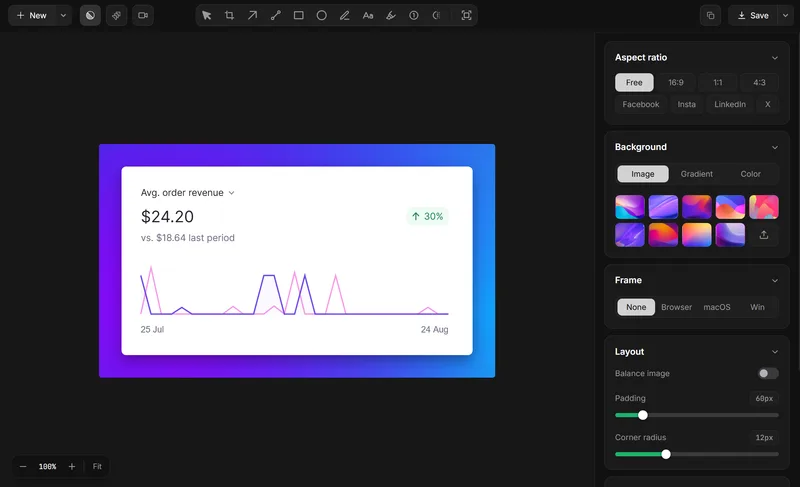
Compare the handoff
The useful AI comparison is where you want the answer to live and how you configure access. Both products have documented AI workflows.
Platforms
ShareX’s official desktop product is for Windows. Lumshot is available for Windows 10 (64-bit) or later and macOS 12 or later. A Mac user should evaluate Lumshot’s workflow directly, not expect a port of ShareX settings or custom uploaders. Lumshot’s Linux version is still in development.
Capture → Explain → Act
ShareX Analyze Image sends an image and prompt to a configured AI API and displays the response in ShareX. Lumshot AI Auto Paste inserts the capture into a supported active conversation. These are different approaches. Existing AI access and any provider charges are separate from the capture app’s license.
Open a supported conversation, capture the relevant screen, and let AI Auto Paste add the image. You add the prompt. Supported apps include ChatGPT, Claude, Cursor, Gemini and GitHub Copilot.
Explore AI Auto PasteSee the screenshot to Cursor workflow or the supported AI setup guide.
Capture, annotate and review the problem, then create the Jira issue with the screenshot included and assign it to your team. Project-specific fields and permissions should be checked in your own Jira setup.
Explore Jira integrationRead how to create a Jira issue from a screenshot and prepare a visual bug report.
OCR and Smart Redaction process locally. Sending content to an AI app, Jira or another destination shares it with that service. Read the privacy policy
Choose by the work you do
Lumshot Free includes unlimited screenshots, annotation, clipboard, drag and PNG/JPG export with a watermark. Pro adds recording and editing, OCR, scrolling, Smart Redaction, AI Auto Paste and Jira, for $29 USD at the current early bird lifetime price. Both plans include lifetime updates.
Compare Lumshot plansTry a real task first
You can try Lumshot alongside your current app. There is no need to uninstall it or move an archive just to compare a new capture.
Start with the installation guide and shortcut guide. Lumshot’s published documentation does not describe a competitor-account or project-import system; these steps do not promise one.
Common questions
It is a Mac option for screenshots, annotation and Pro workflows including recording, OCR, AI Auto Paste and Jira. ShareX officially targets Windows. Lumshot does not promise parity with ShareX custom uploaders or automation.
ShareX is free and open source. Lumshot has a Free plan and a paid Pro license; its published product does not offer the same open-source model. Free screenshots and exports include a watermark.
Yes. Its Analyze Image documentation describes provider, model and API-key configuration, image prompts and an in-app response. Lumshot’s AI Auto Paste instead adds a screenshot to a supported active conversation.
Yes. ShareX documents scrolling capture, screen recording and GIF recording. Lumshot Pro includes scrolling screenshots, screen recording and video editing. Exact tools and export behavior differ.
Keep ShareX if its uploader and automation configuration is essential. Test Lumshot alongside it for AI or Jira tasks, and verify your required destinations rather than assuming they transfer.
Keep comparing
Try a Mac capture or an AI/Jira handoff in Lumshot. Keep ShareX for the custom automation you depend on.
Free capture and annotation. Advanced workflows require Pro.