Choose Snagit if…
You create repeatable guides, training material and visual documentation within the TechSmith ecosystem.
Lumshot vs Snagit
Snagit is a mature screen-capture and visual-documentation tool for Windows and Mac. Lumshot is a Snagit alternative to consider when your daily task is sending visual context to an AI assistant or turning a screenshot into a Jira issue.
Information checked October 8, 2026
Choose Snagit if…
You create repeatable guides, training material and visual documentation within the TechSmith ecosystem.
Choose Lumshot if…
Your captures mainly support debugging, AI conversations and reviewed Jira reports on Windows or Mac.
At a glance
Capabilities overlap. The details and the next step make the difference.
Checked October 8, 2026. Numbers link to official sources. On smaller screens, scroll the table sideways.
| Capability | Snagit | Lumshot |
|---|---|---|
| Screenshot capture | Region, window and full-screen capture [1] | Region, window and full display |
| Scrolling capture | Scrolling capture [1] | Scrolling screenshots |
| Annotation | Text, arrows, callouts and visual editing tools [1] | Arrows, shapes, text, highlights, blur and steps |
| Text recognition | Grab Text and Edit Text [2] | On-device text extraction |
| Redaction | Smart Redact and manual editing tools [1] | Local detection; review and apply protection |
| Screen recording | Screen, microphone, system audio and webcam [1] | Screen, system audio, microphone and camera bubble |
| Recording editing | Trim and combine clips; video-to-GIF tools [1] | Cut, reorder, speed, voiceover and video annotations |
| Sharing | Exports and sharing through the TechSmith ecosystem [1] | Clipboard, drag to supported apps, PNG/JPG exports |
| Platforms | Windows and macOS; check current system requirements [4] | Windows 10 (64-bit)+ and macOS 12+; Linux in development |
| License model | Paid subscription; trial available [3] | Free with watermark; Pro $29 USD early bird, one-time with lifetime updates |
Lumshot’s advanced workflows require Pro. Free capture and annotation include a watermark. This table describes published capabilities, rather than feature parity or a hands-on performance benchmark.
Where Snagit stands out
Snagit offers Step Capture and guide-oriented tools. That focus can matter more than an individual screenshot feature for training and process documentation. [1]
Screenshots, scrolling capture, annotations, recording, trimming and clip combination are established Snagit capabilities. [1]
Grab Text, Edit Text and Smart Redact mean OCR and redaction are not exclusive to Lumshot. Compare their behavior on your own material. [1] [2]
Where Lumshot differs
A training guide and a bug report can begin with the same screenshot but end in different places. Snagit’s documentation tools are valuable when the deliverable is a reusable explanation. Lumshot connects the capture to the conversation or issue where the work continues. A developer can bring visual evidence to an AI assistant; a QA teammate can annotate a problem and review it before creating a Jira issue.
Both products provide capture and editing. The practical comparison is whether your recurring task ends in a guide, a shared visual, a debugging conversation or a ticket. Keep the documentation tools you rely on; do not replace them solely to shorten a different workflow.
Explore screenshot annotation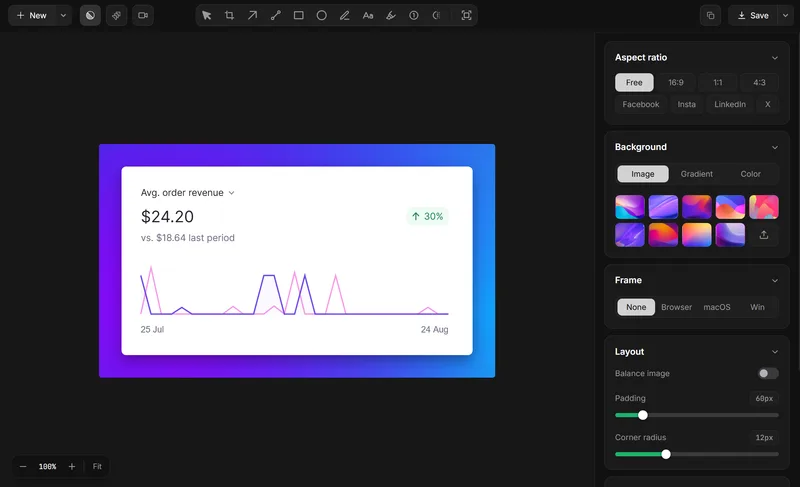
Compare the handoff
If you make both training material and technical reports, test each deliverable separately. One tool does not need to replace every part of your process.
Platforms
Platform alone does not decide Lumshot vs Snagit: both offer Windows and macOS apps. Check the current Snagit system requirements for your machine. Lumshot requires Windows 10 (64-bit) or later or macOS 12 or later. Linux support for Lumshot is still in development.
Capture → Explain → Act
Snagit also advertises built-in AI-assisted capture and editing. Lumshot’s distinction here is narrower: AI Auto Paste into an existing supported conversation, followed by work in that assistant. Do not treat “has AI” as a meaningful yes/no comparison between these products.
Open a supported conversation, capture the relevant screen, and let AI Auto Paste add the image. You add the prompt. Supported apps include ChatGPT, Claude, Cursor, Gemini and GitHub Copilot.
Explore AI Auto PasteSee the screenshot to Cursor workflow or the supported AI setup guide.
Capture, annotate and review the problem, then create the Jira issue with the screenshot included and assign it to your team. Project-specific fields and permissions should be checked in your own Jira setup.
Explore Jira integrationRead how to create a Jira issue from a screenshot and prepare a visual bug report.
OCR and Smart Redaction process locally. Sending content to an AI app, Jira or another destination shares it with that service. Read the privacy policy
Choose by the work you do
Lumshot Free includes unlimited screenshots, annotation, clipboard, drag and PNG/JPG export with a watermark. Pro adds recording and editing, OCR, scrolling, Smart Redaction, AI Auto Paste and Jira, for $29 USD at the current early bird lifetime price. Both plans include lifetime updates.
Compare Lumshot plansTry a real task first
You can try Lumshot alongside your current app. There is no need to uninstall it or move an archive just to compare a new capture.
Start with the installation guide and shortcut guide. Lumshot’s published documentation does not describe a competitor-account or project-import system; these steps do not promise one.
Common questions
Its documented Pro workflows include automatic screenshot insertion into supported AI conversations and creating Jira issues after annotation and review. Those handoffs are the comparison angle; Snagit already covers core screenshots, scrolling capture, OCR and recording.
Yes. Snagit documents Grab Text and Edit Text, as well as scrolling capture. These are overlapping capabilities rather than reasons to describe one product as a complete replacement for the other.
Yes. Both document microphone and system audio, webcam/camera support and video editing. Check the relevant version and platform for exact recording behavior.
Free includes unlimited screenshots and annotations, clipboard, drag and PNG/JPG export with a watermark. Recording, OCR, scrolling capture, Smart Redaction, AI Auto Paste and Jira require Pro.
Compare Snagit’s guide and Step Capture tools before switching. Lumshot may complement your technical reporting, but the documented AI and Jira workflows do not establish a replacement for your guide-production process.
Keep comparing
Try Lumshot on a debugging conversation or Jira report. Keep your guide-production workflow while comparing the handoff.
Free capture and annotation. Advanced workflows require Pro.