Capture & edit
Screenshot annotation tool
Annotate screenshots with arrows, text, shapes, highlights and numbered steps. Lumshot’s screenshot editor works on Windows and Mac; Free includes annotations with a watermark.
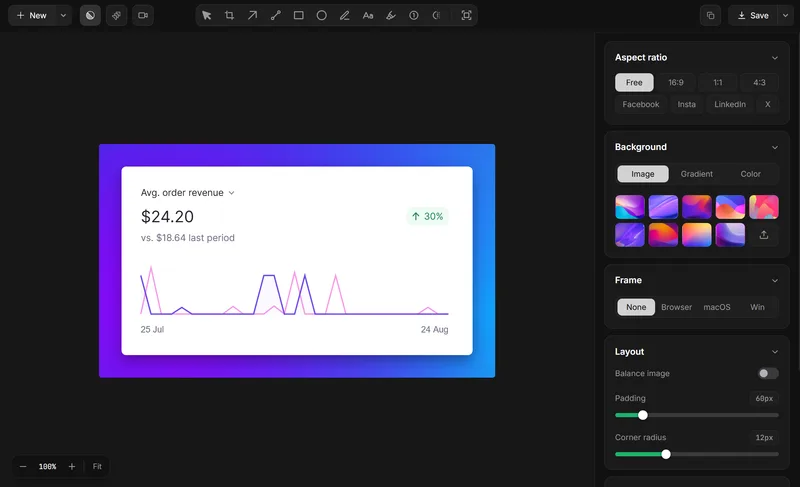
How to annotate a screenshot
- Capture the region, window or display you want to explain.
- Open the capture in Lumshot’s screenshot editor.
- Add arrows, text or highlights to identify the relevant detail.
- Check the image for private information.
- Copy, drag or export the finished screenshot.
Use the markup to explain a specific point. An arrow and a short note are often clearer than several overlapping shapes.
Annotation tools
- Arrows
- Point to the detail that needs attention.
- Shapes
- Use rectangles, circles, and lines to mark an area.
- Text
- Add instructions or feedback directly to the capture.
- Highlights
- Emphasize information while keeping it readable.
- Blur
- Hide private details before sharing.
- Step counter
- Number a sequence for a tutorial or walkthrough.
Explain a UI bug with screenshot markup
Highlight where the issue appears and add a short note about what you expected. Keep the visible error or affected control readable. The screenshot gives your team a shared reference, while your report supplies reproduction steps and environment details.
For a QA handoff, use the screenshot bug reporting workflow. Pro can create a Jira issue from your reviewed capture.
Arrows, text and highlights for different tasks
Add arrows to a screenshot
Point to the affected button or misaligned element and describe the expected result in a short text note.
Number a sequence
Use the step counter to label the order of controls in a tutorial. Record your screen instead when timing or movement is essential.
Protect private details
Use blur where appropriate, then inspect the full image before sharing. For local detection of sensitive information, see Smart Redaction; no detection tool removes the need for review.
Screenshot editor questions
Is annotation included in Free?
Yes. Free includes unlimited captures and annotations, with a watermark on exports. Compare Free and Pro for the advanced workflows.
Can I use the screenshot editor on Windows and Mac?
Both platforms have Lumshot downloads. Linux is in development.
Put this workflow to work.
Lumshot is available for Windows and macOS. Start with Free capture and annotation; compare Pro for the advanced tools.